设置静态 IP
ℹ️ 执行下面的命令 编辑网络配置文件
bash
nano /etc/network/interfacesℹ️ 默认文件看起来应该是这样的
bash
# This file describes the network interfaces available on your system
# and how to activate them. For more information, see interfaces(5).

source /etc/network/interfaces.d/*

# The loopback network interface
auto lo
iface lo inet loopback

# The primary network interface
allow-hotplug ens18
iface ens18 inet dhcp
ℹ️ 把它改成下面这样
ens18 :就是当前的网卡,把 dhcp 去掉gateway:网关地址,一般是路由器地址
address:就是你要设置的 静态IP地址
dns-nameservers:DNS 地址,我这里用网关的
bash
# This file describes the network interfaces available on your system
# and how to activate them. For more information, see interfaces(5).

source /etc/network/interfaces.d/*

# The loopback network interface
auto lo
iface lo inet loopback

# The primary network interface
allow-hotplug ens18

iface ens18 inet static
    address 192.168.100.120
    netmask 255.255.255.0
    gateway 192.168.100.1
    dns-nameservers 192.168.100.1
#iface ens18 inet dhcp
ℹ️ 重启系统
bash
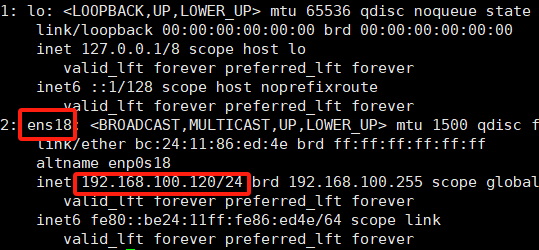
rebootℹ️ 重新连接之后,执行下面的命令 验证配置,查看接口 IP 地址是否已更新
bash
ip aℹ️ 正常显示如下图,也可以登录路由器管理界面查看